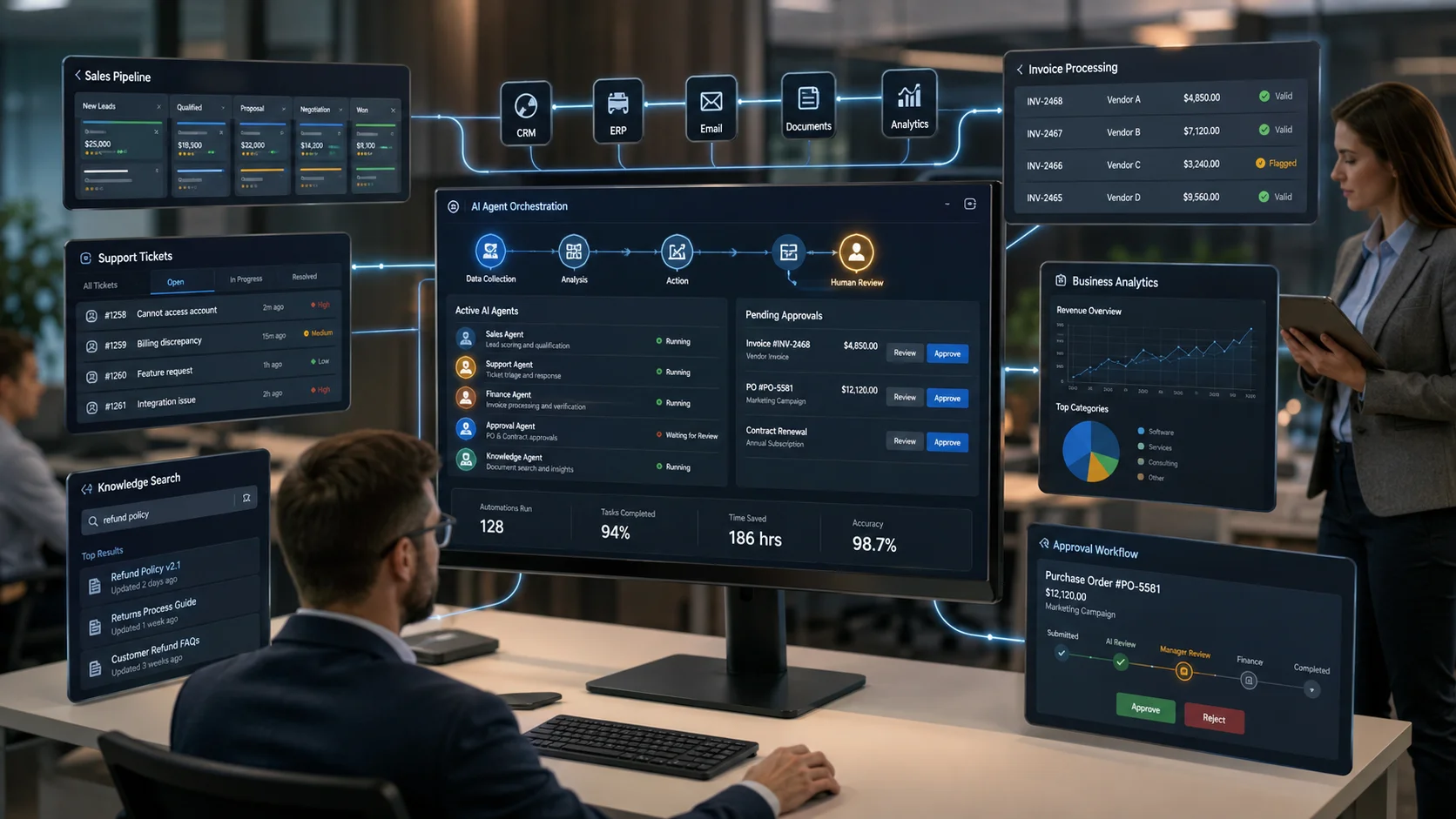
AI agents for business automation are moving beyond simple chat interfaces and becoming part of real operational workflows. Instead of only answering a question or generating text, an AI agent can analyze information, make decisions within defined boundaries, use connected tools, and complete multi-step tasks across business systems.
For businesses, the important question in 2026 is no longer simply, “Can we use AI?” The more useful question is, “Which business processes can AI improve safely, measurably, and economically?”
This distinction matters. A successful AI implementation does not begin with adding artificial intelligence everywhere. It begins by identifying repetitive work, information bottlenecks, slow handoffs, fragmented systems, and decision processes where AI can provide practical value.
In this guide, we examine what AI agents are, how they differ from chatbots and traditional automation, ten practical business use cases, implementation considerations, risks, and how businesses can determine whether they need an off-the-shelf solution or custom AI agent development.
What Are AI Agents for Business Automation?
An AI agent is a software system designed to work toward a defined goal by interpreting information, deciding what action should happen next, and interacting with tools or systems to complete a task.
Traditional software usually follows explicitly programmed steps. For example:
- A form is submitted.
- The data is stored.
- An email is sent.
- A task is assigned.
An AI agent can operate within a less rigid process. It may interpret an incoming request, identify its intent, retrieve relevant information, decide which workflow applies, call an API, update a business system, prepare a response, and escalate the case to a person when confidence is low or approval is required.
The practical value of AI agents for business automation comes from combining reasoning capabilities with business data, APIs, workflow rules, and existing software systems.
AI Agents vs Chatbots vs Traditional Automation
These technologies are related, but they solve different problems.
| Technology | Primary Function | Typical Behavior |
|---|---|---|
| Chatbot | Conversation | Responds to questions and predefined intents |
| AI Assistant | User assistance | Generates content, summarizes information, and supports user tasks |
| Traditional Automation | Rule-based execution | Follows predefined triggers, conditions, and actions |
| AI Agent | Goal-oriented execution | Interprets context, chooses actions, uses tools, and works through multi-step tasks |
This does not mean AI agents should replace conventional automation. In many reliable systems, the best architecture combines both approaches.
AI can interpret an unstructured email, document, or customer request. A deterministic workflow can then validate data, process a transaction, send an approved notification, or update a system of record.
This combination of AI reasoning and controlled automation is often more practical than allowing an AI model to control an entire business process without boundaries.
Why Businesses Are Exploring AI Agents in 2026
Businesses already use multiple software systems for sales, finance, customer service, operations, HR, analytics, inventory, and communication. The problem is often not a lack of software. The problem is the manual work required to move information between systems and interpret what should happen next.
Employees may spend significant time:
- reading and classifying emails,
- copying data between applications,
- searching internal documents,
- preparing repetitive reports,
- checking the status of multiple systems,
- qualifying incoming enquiries,
- summarizing customer histories,
- routing requests to the correct department,
- following up on incomplete processes, and
- coordinating work across disconnected software.
AI automation for business can reduce some of this operational friction when the implementation is designed around a clearly defined process.
Businesses evaluating these opportunities can also review our AI development and automation services, which focus on practical automation, integration, and measurable operational improvements rather than AI adoption for its own sake.
10 Practical Use Cases of AI Agents for Business Automation
1. AI Customer Support Agents
Customer support is one of the clearest applications of AI agents for business automation, but the opportunity extends beyond adding a chatbot to a website.
A properly integrated customer service agent can:
- understand the intent of a support request,
- search approved knowledge sources,
- retrieve account or order information,
- classify the issue by urgency and category,
- suggest troubleshooting steps,
- create or update a support ticket,
- prepare a contextual response, and
- escalate complex cases to the appropriate team.
For example, an eCommerce customer asking, “Why has my order not arrived?” should not receive a generic shipping policy response if the agent has permission to retrieve actual order and shipment information.
The agent can identify the customer, retrieve the order status through an API, check the delivery timeline, and provide a relevant answer. If the shipment is delayed beyond an approved threshold, it can create an escalation task.
The important architectural principle is controlled access. The AI agent should only access data and perform actions permitted for the specific workflow and user context.
2. Sales Lead Qualification and CRM Automation
Sales teams often receive leads through website forms, emails, advertising campaigns, directories, referrals, and other sources. The information quality varies significantly.
An AI sales agent can analyze incoming enquiries and help with tasks such as:
- extracting company and requirement information,
- identifying the requested service or product,
- classifying leads by predefined criteria,
- detecting missing information,
- preparing follow-up questions,
- updating CRM records,
- assigning leads to the appropriate sales representative, and
- creating follow-up tasks.
For a custom software company, for example, an incoming message mentioning a multi-branch inventory system, mobile application, payment integration, and management dashboard could be classified differently from a simple brochure website enquiry.
The AI agent does not need to make the final commercial decision. It can organize the information, apply approved qualification criteria, and give the sales team a better starting point.
3. Internal Knowledge and Document Retrieval Agents
Many organizations have valuable information spread across documents, internal portals, policies, project files, technical documentation, FAQs, and databases.
Employees often know the information exists but do not know where to find it.
An internal knowledge agent can provide a conversational interface over approved organizational information. Depending on the implementation, it can:
- search relevant documents,
- retrieve passages related to a question,
- summarize policies,
- compare information across documents,
- answer questions with source references, and
- restrict access according to employee permissions.
This is particularly useful for businesses with extensive operating procedures, product documentation, technical knowledge, training material, or distributed teams.
However, the quality of the result depends heavily on document quality, retrieval architecture, permissions, data freshness, and evaluation. Connecting an AI model to a folder of files is not automatically a reliable knowledge system.
4. Invoice and Finance Workflow Assistance
Finance operations contain many repetitive document and verification tasks that can benefit from carefully controlled AI assistance.
An AI agent can help:
- extract invoice information,
- identify supplier and purchase order references,
- check for missing fields,
- detect possible duplicate invoices,
- compare information with connected records,
- route exceptions for review, and
- prepare reconciliation summaries.
Financial workflows require strong controls. An AI agent should not independently approve significant payments simply because it can interpret an invoice.
A safer design separates intelligent document interpretation from deterministic validation and human approval. AI can prepare and classify the information, while business rules and authorized staff control financial decisions.
5. eCommerce Operations Agents
Online stores generate continuous operational work across products, customers, orders, inventory, support, returns, and marketing.
Business process automation with AI can support eCommerce operations by helping teams:
- classify customer enquiries,
- prepare product information from structured data,
- identify frequently asked pre-purchase questions,
- summarize customer feedback,
- detect recurring return reasons,
- assist with catalog data normalization,
- monitor operational exceptions, and
- coordinate information across store, CRM, inventory, and support systems.
The strongest opportunities usually appear where the business has sufficient transaction volume and employees are repeatedly performing the same information-processing work.
Businesses planning a custom commerce platform can explore our eCommerce development services for systems requiring custom workflows, integrations, or operational dashboards.
6. HR and Employee Support Agents
HR teams repeatedly answer questions about policies, leave procedures, onboarding requirements, benefits, documentation, and internal processes.
An employee support agent can provide controlled access to approved HR information and assist with common workflows.
Potential tasks include:
- answering policy questions,
- providing onboarding checklists,
- guiding employees to appropriate forms,
- summarizing training resources,
- collecting initial information for HR requests, and
- routing sensitive cases to authorized personnel.
Privacy is critical in HR applications. The system should enforce access permissions and avoid exposing employee information outside authorized roles.
The objective is not to replace human judgment in sensitive employment matters. The practical objective is to reduce repetitive administrative work while improving access to consistent information.
7. Reporting and Business Intelligence Agents
Business data often exists across CRM systems, ERP platforms, sales databases, support applications, spreadsheets, and custom software.
Managers may spend hours collecting data before they can begin analyzing it.
An AI reporting agent can help users interact with approved data through natural-language requests such as:
- “Summarize this month’s sales pipeline changes.”
- “Which support categories increased compared with last month?”
- “Show delayed orders requiring operational attention.”
- “Summarize the main reasons for customer cancellations.”
The agent can retrieve relevant data through controlled tools, apply approved calculations, and prepare summaries for review.
For reliable reporting, numerical calculations should be handled by deterministic queries or analytics systems where possible. The AI layer can help interpret the question and explain the result, but it should not invent or estimate business figures.
8. IT Operations and Server Support Agents
IT teams work with monitoring alerts, logs, service tickets, infrastructure documentation, deployment procedures, and recurring maintenance tasks.
An AI operations agent can assist by:
- classifying monitoring alerts,
- summarizing log information,
- correlating related incidents,
- retrieving relevant troubleshooting procedures,
- preparing incident summaries,
- creating or updating support tickets, and
- recommending approved diagnostic steps.
High-impact actions should remain controlled. Restarting production services, modifying firewall rules, changing infrastructure configuration, or deploying code should require appropriate permissions and approval mechanisms.
Organizations requiring infrastructure management and technical assistance can also review our server support services.
9. CRM and ERP Coordination Agents
CRM and ERP systems are central to many businesses, but employees still perform manual coordination around them.
Consider a business process involving:
- a customer enquiry,
- a quotation,
- an approval,
- an order,
- inventory verification,
- payment status,
- delivery coordination, and
- customer communication.
When these stages involve multiple systems and departments, delays and data inconsistencies can occur.
An AI coordination agent can monitor workflow context, identify missing information, prepare updates, request approvals, and trigger predefined actions through connected APIs.
This is one of the strongest areas for custom AI agent development because every business has different workflows, software systems, approval structures, and data models.
A generic AI tool may understand language, but it does not automatically understand how a specific company handles quotations, credit limits, inventory reservations, branch permissions, or exception approvals.
10. Multi-System Workflow Orchestration
The most advanced use of AI agents for business automation is not a single isolated agent. It is coordinated workflow execution across multiple business systems.
For example, a service business may receive an enquiry by email. An agent could:
- interpret the enquiry,
- extract structured requirement information,
- check the existing CRM for the company,
- create or update the opportunity,
- retrieve relevant service information,
- prepare follow-up questions,
- assign the opportunity based on territory or expertise, and
- schedule an internal follow-up task.
Each action should operate within permissions, business rules, confidence thresholds, and audit requirements.
For businesses that need custom interfaces for these workflows, web portal development can provide the operational layer through which users review tasks, approve actions, monitor agent activity, and access business data.
How AI Agents Work with Existing Business Systems
A common misconception is that implementing AI agents requires replacing existing business software.
In many cases, the better approach is integration.
An AI agent can work as an orchestration and reasoning layer connected to existing systems through:
- REST APIs,
- webhooks,
- database services,
- CRM APIs,
- ERP integrations,
- document retrieval systems,
- email services,
- authentication systems, and
- custom business applications.
A practical architecture may contain several layers:
1. User Interaction Layer
This can be a web application, internal portal, mobile application, chat interface, helpdesk interface, or existing business system.
2. Agent Orchestration Layer
This layer interprets goals, manages context, selects approved tools, and coordinates task execution.
3. Business Logic Layer
Existing application logic and deterministic rules should continue to handle processes requiring predictable outcomes.
4. Integration Layer
APIs and connectors allow the agent to retrieve information and perform approved actions in connected systems.
5. Data and Knowledge Layer
This may include databases, documents, CRM records, product information, policies, or other approved knowledge sources.
6. Governance and Monitoring Layer
Logging, permissions, human approvals, evaluation, usage limits, and security controls help keep the system observable and manageable.
Benefits of AI Agents for Business Automation
The business value of AI agents depends on the workflow, implementation quality, and operational adoption. When applied to suitable processes, potential benefits include:
- Reduced repetitive work: Teams spend less time classifying, copying, searching, and summarizing information.
- Faster response times: Routine enquiries and operational events can be processed more quickly.
- Better system coordination: Agents can help connect workflows spanning multiple applications.
- More consistent processes: Approved rules, knowledge sources, and escalation paths can be applied consistently.
- Improved employee productivity: Employees can spend more time on decisions and exceptions that require human expertise.
- Better use of existing data: AI can make internal information easier to retrieve and use.
- Scalable operations: Repetitive information-processing work can be handled without increasing manual workload at the same rate as business growth.
These benefits should be measured against implementation cost, model usage cost, integration complexity, error rates, and the operational effort required to monitor the system.
Risks and Limitations Businesses Should Consider
AI agents can be useful, but businesses should not treat autonomy as the primary goal.
The objective should be the right level of automation for the risk of the process.
Hallucination and Incorrect Decisions
AI systems can produce incorrect outputs. High-impact workflows should include validation, constrained tool access, reliable data retrieval, and human approval where necessary.
Excessive System Permissions
An agent should not receive unrestricted access to every business system simply because integration is technically possible.
Apply least-privilege access and separate read permissions from high-impact write actions.
Data Privacy
Businesses must understand what data is sent to AI services, how it is processed, where it is stored, and which employees or systems can access the output.
Prompt Injection and Untrusted Content
Agents that process emails, documents, web content, or external data may encounter malicious or misleading instructions. System architecture should treat untrusted content as data rather than automatically executable instructions.
Automation Without Clear ROI
Not every process needs an AI agent. A simple rule-based workflow may be cheaper, faster, and more reliable for predictable processes.
The decision should be based on business value, variability, data quality, integration requirements, risk, and expected operational savings.
When Does a Business Need Custom AI Agent Development?
Off-the-shelf AI tools are useful for general productivity tasks. However, custom AI agent development becomes relevant when the agent must understand and operate within unique business processes.
A custom approach may be appropriate when:
- the workflow spans multiple internal systems,
- the business has proprietary data or knowledge,
- role-based access is required,
- industry-specific processes must be supported,
- custom APIs or legacy systems need integration,
- human approval workflows are required,
- agent actions must be logged and audited,
- the business needs a custom user interface or portal, or
- generic AI software cannot match the actual operational workflow.
At Digitize Info System, the focus is on practical AI implementations that connect with real business systems, workflows, portals, CRM platforms, ERP processes, APIs, and operational data.
You can review our AI automation and development capabilities or explore our portfolio to understand the types of custom software systems and business platforms we develop.
How to Start an AI Agent Project
A business should not begin by asking which AI agent framework to use. Technology selection comes after the business problem is understood.
A practical implementation process can follow these stages:
Step 1: Identify a Specific Workflow
Choose a process with clear inputs, outputs, users, pain points, and measurable business impact.
Step 2: Map the Current Process
Document how work is currently completed, including systems, manual decisions, approvals, exceptions, and delays.
Step 3: Separate AI Tasks from Deterministic Tasks
Use AI where interpretation, classification, summarization, or contextual reasoning is useful. Keep predictable rules and critical calculations deterministic where possible.
Step 4: Define Agent Permissions
Specify exactly what information the agent can access and which actions it can perform.
Step 5: Add Human Approval Points
Identify decisions that require human review based on financial impact, legal implications, security, customer impact, or low model confidence.
Step 6: Build a Controlled Pilot
Start with a narrow workflow and evaluate accuracy, failure modes, response quality, time saved, and operational cost.
Step 7: Monitor and Improve
AI agent systems require evaluation and operational monitoring. Review failures, update knowledge sources, improve instructions, and refine workflows based on real usage.
The Future of AI Agents and Business Automation
In 2026, the most useful direction for business AI is not unlimited autonomous software. It is controlled, integrated, and observable AI that helps businesses execute specific processes more effectively.
AI agents will increasingly work alongside traditional software, APIs, workflow automation, CRM systems, ERP platforms, custom portals, and human teams.
The businesses likely to gain the most value will be those that understand their processes before automating them.
A poorly defined workflow does not become efficient simply because an AI model is added to it. The foundation remains process design, reliable data, appropriate system integration, security controls, and clear accountability.
Conclusion
AI agents for business automation represent a practical evolution from conversational AI toward systems that can assist with real business processes.
The strongest opportunities are not necessarily the most futuristic. They are often found in everyday operational problems: slow lead processing, repetitive customer support work, fragmented internal knowledge, manual document handling, disconnected CRM and ERP workflows, repetitive reporting, and system coordination.
The right approach is to start with a clear business problem, define the required data and integrations, separate AI reasoning from deterministic business logic, control permissions, include human approval where needed, and measure actual business results.
When implemented carefully, AI agents can become a useful layer within a broader digital business system—connecting people, data, workflows, and software more effectively.
Ready to Explore AI Automation for Your Business?
If your team is spending significant time on repetitive information processing, manual system coordination, customer request handling, reporting, or workflow administration, a focused AI automation assessment can help identify where automation is practical and where traditional software remains the better choice.
Explore our AI development services or contact Digitize Info System to discuss an AI agent, workflow automation system, custom portal, or business software integration requirement.
Frequently Asked Questions
AI agents can automate tasks like data analysis, customer outreach, scheduling, order processing, and routine decision-making. They can also coordinate across systems to complete multi-step workflows with minimal human intervention.
For businesses, that means AI agents can free up teams from repetitive work and allow them to focus on more strategic activities.
AI agents add value beyond traditional automation by using intelligence to interpret data, learn from outcomes, and adapt to changing conditions. They can handle more complex scenarios where rules alone are not enough.
This makes them particularly useful for business processes that benefit from a blend of automation and contextual decision-making.
Practical AI agent use cases include customer support triage, lead qualification, invoice management, and workflow orchestration. These applications help businesses reduce manual effort and improve response times across key operational areas.
When deployed carefully, AI agents can make daily business processes more consistent and efficient.
Businesses should define boundaries for AI agents to ensure they operate safely and align with business rules. Clear boundaries prevent agents from taking inappropriate actions and help maintain accountability across automated workflows.
This guidance is essential for gaining trust in AI systems and ensuring they contribute positively to the business.
