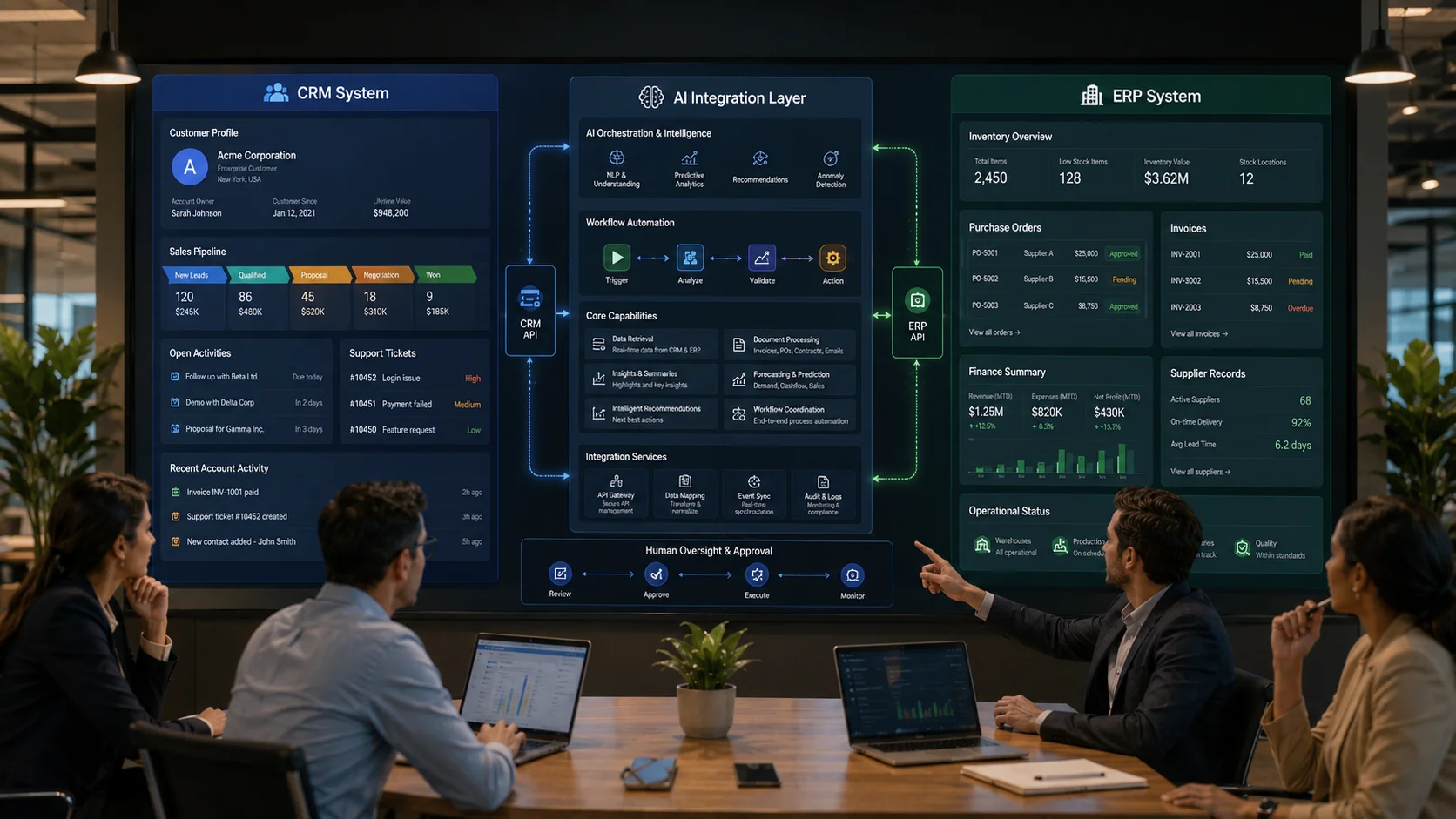
AI integration with CRM and ERP systems does not necessarily require replacing the software a business already uses. In many cases, the more practical approach is to connect artificial intelligence capabilities with existing customer, sales, finance, inventory, purchasing, manufacturing, service, and operational systems.
Businesses have spent years building processes around CRM and ERP platforms. These systems contain valuable customer histories, transactions, product data, supplier information, financial records, inventory movements, service requests, and operational knowledge.
The challenge is that much of this information still requires employees to manually search, interpret, summarize, classify, compare, and act upon it.
This is where enterprise AI integration can provide practical value.
AI can help employees understand large volumes of business information, automate repetitive decisions, extract data from documents, summarize customer histories, qualify sales enquiries, identify operational exceptions, generate forecasts, and coordinate workflows between systems.
However, successful integration requires more than connecting an AI model to a database.
A production implementation must address business processes, data quality, APIs, permissions, security, model accuracy, workflow design, human approval, monitoring, and system ownership.
This guide explains how businesses can integrate AI into existing business software, including CRM and ERP platforms, without unnecessarily replacing systems that already perform important operational functions.
What Does AI Integration With CRM and ERP Mean?
AI integration with CRM and ERP means adding artificial intelligence capabilities to workflows that use existing business systems.
The AI layer may:
- read information from the CRM or ERP,
- interpret unstructured information such as emails and documents,
- classify records,
- generate summaries,
- identify patterns or exceptions,
- recommend actions,
- trigger approved workflows,
- update records through controlled APIs, or
- provide employees with a conversational interface for business information.
The CRM or ERP generally remains the system of record.
AI acts as an intelligence, assistance, or orchestration layer around defined workflows.
This distinction is important because many businesses assume that adopting AI means migrating their entire operational platform. In reality, integration can often deliver value incrementally.
A Simple Example of AI-Powered CRM Integration
Consider a business receiving a new sales enquiry by email.
Without AI integration, an employee may need to:
- read the email,
- identify the company and contact,
- understand the requirement,
- check whether the contact already exists in the CRM,
- create or update the opportunity,
- select a lead category,
- assign a sales representative,
- write follow-up questions, and
- schedule a reminder.
An AI-integrated workflow can assist with several of these steps.
The system can extract structured information from the enquiry, identify intent, check existing CRM records through an API, suggest a classification, prepare follow-up questions, and create a draft CRM update.
Depending on business rules, the update can either happen automatically or wait for employee approval.
A Simple Example of AI-Powered ERP Integration
Consider a purchasing team processing supplier quotations.
An AI-integrated workflow could:
- read quotation documents,
- extract products, quantities, prices, taxes, and delivery terms,
- match items against ERP product records,
- compare quotations,
- identify missing or unusual information,
- prepare a comparison summary, and
- send the result to an authorized manager for review.
The ERP remains responsible for official purchasing records and transactions. AI assists with information processing and workflow preparation.
Why Integrate AI Instead of Replacing Existing Systems?
CRM and ERP replacements are significant business projects.
A mature system may contain years of:
- customer records,
- financial transactions,
- inventory history,
- custom business logic,
- reports,
- integrations,
- user permissions,
- approval workflows, and
- employee knowledge.
Replacing the entire system solely to gain AI capabilities may introduce unnecessary cost and risk.
Integration allows the business to modernize specific workflows while preserving useful existing systems.
This approach can provide several advantages:
- lower migration risk,
- faster pilot implementation,
- incremental investment,
- less disruption to employees,
- continued use of established business logic, and
- the ability to test AI value before expanding the implementation.
Businesses exploring these types of integrations can review our AI development services for custom AI workflows, AI agents, document intelligence, knowledge systems, and business software integrations.
Where Can AI Add Value to CRM Systems?
CRM platforms contain valuable sales and customer information, but the quality of the system often depends on employees manually entering and interpreting data.
AI can improve CRM workflows in several practical areas.
1. Lead Classification and Qualification
Sales enquiries arrive in different formats and with different levels of detail.
AI can analyze:
- website enquiries,
- emails,
- chat transcripts,
- campaign responses, and
- uploaded requirement documents.
The system can extract information such as:
- company name,
- industry,
- location,
- requested product or service,
- project type,
- urgency,
- budget information when explicitly provided, and
- missing information required for qualification.
The output can be used to prepare CRM records and route leads according to business rules.
AI should assist qualification rather than invent information that the prospect did not provide.
2. Customer History Summaries
A long-term customer may have:
- multiple opportunities,
- support tickets,
- emails,
- orders,
- meeting notes,
- payment history, and
- service records.
An AI layer can retrieve approved information and prepare a concise account summary before a sales or service interaction.
This can help employees understand:
- the current relationship,
- recent issues,
- open opportunities,
- important commitments, and
- recommended next steps based on defined rules.
3. Sales Follow-Up Assistance
AI can help identify opportunities that require attention and prepare contextual follow-up drafts.
For example, the workflow may detect that:
- a quotation was sent seven days ago,
- no follow-up activity is recorded,
- the opportunity remains open, and
- the customer previously requested a specific delivery timeline.
The system can prepare a follow-up draft for the assigned salesperson.
The employee remains responsible for reviewing the communication and managing the relationship.
4. CRM Data Quality Improvement
CRM databases frequently contain inconsistent information.
AI-assisted workflows can help identify:
- possible duplicate companies,
- incomplete descriptions,
- inconsistent industry classifications,
- missing contact roles,
- poorly structured meeting notes, and
- records requiring human review.
Deterministic matching rules should still be used where exact comparison is possible. AI is most useful for ambiguous or unstructured information.
5. Customer Service Coordination
When CRM and support systems are connected, AI can help:
- classify requests,
- retrieve customer context,
- identify previous related issues,
- search approved knowledge sources,
- prepare responses, and
- escalate cases based on urgency or business rules.
This is more useful than a disconnected chatbot that cannot access customer or service context.
Where Can AI Add Value to ERP Systems?
ERP systems manage structured business processes across finance, inventory, procurement, manufacturing, logistics, and operations.
AI can assist where these structured processes interact with large volumes of documents, exceptions, predictions, and human decisions.
1. Intelligent Document Processing
Businesses process invoices, purchase orders, quotations, delivery notes, contracts, expense documents, and other records.
AI can help extract and classify information from these documents.
A controlled workflow can:
- receive a document,
- identify its type,
- extract required fields,
- validate information against ERP records,
- identify discrepancies,
- prepare a transaction draft, and
- route exceptions for human review.
The objective is not to allow an AI model to independently create financial truth.
The objective is to reduce repetitive data processing while maintaining validation and approval controls.
2. Inventory Analysis and Exception Detection
AI can help operational teams interpret inventory information by identifying patterns and exceptions.
Possible applications include:
- slow-moving inventory identification,
- unusual consumption patterns,
- stockout risk indicators,
- branch-level inventory imbalances,
- supplier delivery anomalies, and
- items requiring management attention.
Predictive models should be evaluated against historical data and business conditions. Forecasting should not be presented as certainty.
3. Procurement Assistance
Procurement teams often compare supplier information across quotations, ERP records, contracts, and previous purchases.
AI can assist by:
- extracting quotation information,
- summarizing supplier terms,
- identifying unusual price changes,
- comparing delivery conditions,
- checking required information, and
- preparing structured comparisons.
Commercial approval should remain subject to company policy and authorized decision makers.
4. Finance and Reconciliation Assistance
AI-assisted workflows can support finance teams by helping classify transactions, interpret documents, summarize exceptions, and prepare reconciliation work.
For example, an integration may compare:
- invoice references,
- purchase order information,
- received quantities,
- supplier details, and
- payment status.
Rules can identify exact mismatches, while AI can help explain complex exceptions and prepare information for review.
5. Operational Reporting
ERP systems contain large volumes of structured data, but managers may still depend on technical teams or analysts for every new report.
An AI interface can help translate a natural-language business question into an approved data request.
Examples include:
- “Which branches have the highest increase in overdue receivables?”
- “Summarize delayed purchase orders this month.”
- “Which products have declining sales but increasing inventory?”
- “Show operational exceptions requiring management attention.”
The AI layer should use validated queries and calculations rather than generating numerical answers from model memory.
AI Integration With CRM and ERP: Reference Architecture
A reliable enterprise implementation generally needs more than a direct connection between an AI model and a database.
A practical architecture can contain the following layers.
1. CRM and ERP Systems of Record
The existing business applications continue to maintain official customer, transaction, inventory, finance, and operational records.
2. Integration and API Layer
This layer provides controlled connectivity between AI services and business applications.
Depending on the existing software, integration methods may include:
- REST APIs,
- GraphQL APIs,
- webhooks,
- event streams,
- message queues,
- approved database services,
- scheduled synchronization, and
- middleware or integration platforms.
3. AI Orchestration Layer
This layer manages model interactions, tools, workflow state, prompts, context, retries, and task coordination.
For agent-based implementations, it also controls which tools are available for each task.
4. Knowledge and Retrieval Layer
Some use cases require access to:
- product documentation,
- company policies,
- sales material,
- support knowledge,
- contracts,
- technical documentation, and
- standard operating procedures.
A retrieval layer can provide relevant approved information to the AI system when needed.
5. Business Rules and Validation Layer
Critical business logic should not depend entirely on probabilistic model output.
This layer can enforce:
- credit limits,
- approval thresholds,
- mandatory fields,
- pricing rules,
- transaction validation,
- user permissions, and
- workflow status transitions.
6. Human Approval Layer
Employees should review high-impact or uncertain actions.
Examples include:
- financial approvals,
- large discounts,
- contractual communication,
- customer account changes,
- significant inventory adjustments, and
- actions with legal or compliance implications.
7. Monitoring and Audit Layer
A production system should record relevant information about:
- agent requests,
- tool usage,
- data sources,
- workflow outcomes,
- errors,
- approval decisions, and
- performance metrics.
This helps teams evaluate system quality and investigate failures.
Step-by-Step Process to Integrate AI Into Existing CRM and ERP Systems
Step 1: Identify the Business Problem
Do not begin by selecting an AI model or agent framework.
Begin with a process problem.
Examples include:
- salespeople spend too much time entering lead information,
- support teams cannot quickly find customer context,
- supplier quotation comparison is manual,
- invoice processing creates a backlog,
- management reporting requires repeated analyst effort, or
- employees manually coordinate work between CRM and ERP systems.
A clear problem provides a basis for measuring whether the integration creates value.
Step 2: Map the Existing Workflow
Document:
- who starts the process,
- which systems are involved,
- which data is required,
- where manual decisions occur,
- which approvals are required,
- what exceptions are common, and
- how success is measured.
Many automation projects fail because teams automate an incomplete understanding of the process.
Step 3: Assess Data Quality
AI cannot reliably compensate for fundamentally poor business data.
Review:
- duplicate records,
- missing fields,
- inconsistent naming,
- outdated information,
- unstructured notes,
- incorrect relationships between records, and
- access permission problems.
Some data cleanup may be required before AI integration.
Step 4: Review Integration Capabilities
Identify what the existing CRM and ERP systems support.
Check for:
- documented APIs,
- authentication methods,
- webhooks,
- rate limits,
- event capabilities,
- batch export and import options,
- custom module support, and
- available sandbox environments.
The architecture should match the actual capabilities of the systems rather than assume every application supports real-time bidirectional integration.
Step 5: Define the AI Role
Clearly separate what AI should do from what conventional software should do.
AI is useful for tasks such as:
- classification,
- summarization,
- information extraction,
- natural-language interaction,
- semantic retrieval,
- draft generation, and
- contextual reasoning.
Traditional software is generally more appropriate for:
- exact calculations,
- financial posting,
- permission enforcement,
- transaction integrity,
- mandatory validations, and
- deterministic business rules.
Step 6: Design Permissions and Security
An AI integration should not automatically receive unrestricted access to all CRM and ERP information.
Apply the principle of least privilege.
For example, a sales assistant may need permission to:
- read assigned opportunities,
- retrieve customer communication history, and
- prepare draft activity updates.
It may not need permission to:
- read payroll information,
- change financial transactions,
- modify system configuration, or
- access every customer account.
Step 7: Build a Focused Pilot
Start with one workflow rather than attempting to make the entire organization “AI-powered” at once.
A good pilot should have:
- a defined user group,
- clear inputs and outputs,
- measurable time or quality improvements,
- manageable risk, and
- sufficient transaction volume for meaningful evaluation.
Step 8: Test Real Failure Scenarios
Testing should include more than successful examples.
Evaluate:
- missing information,
- duplicate records,
- ambiguous requests,
- API failures,
- permission failures,
- incorrect document formats,
- model errors,
- unexpected user instructions, and
- long-running workflow interruptions.
Step 9: Add Monitoring and Evaluation
Measure the system against operational objectives.
Depending on the workflow, metrics may include:
- classification accuracy,
- document extraction accuracy,
- percentage of tasks requiring correction,
- employee time saved,
- response time,
- workflow completion rate,
- escalation rate, and
- cost per completed task.
Step 10: Expand Based on Evidence
Once one integration produces reliable value, expand carefully into adjacent workflows.
For example:
- start with enquiry classification,
- add CRM record preparation,
- add follow-up assistance,
- connect quotation workflows, and
- later coordinate approved information with ERP processes.
This is generally safer than beginning with a large autonomous system controlling multiple departments.
Common AI Integration Patterns for CRM and ERP
Pattern 1: Read and Summarize
The AI system reads approved data and produces summaries without changing source records.
This is useful for:
- account summaries,
- sales pipeline analysis,
- support history summaries, and
- operational reports.
Pattern 2: Read, Recommend, and Request Approval
The system analyzes information and recommends an action, but an employee must approve it.
This is suitable for:
- discount recommendations,
- supplier comparisons,
- customer escalation,
- purchase recommendations, and
- exception handling.
Pattern 3: Extract, Validate, and Create a Draft
AI extracts information from unstructured data. Conventional software validates it and prepares a draft transaction.
This is useful for:
- invoice processing,
- purchase orders,
- expense documents,
- lead creation, and
- service requests.
Pattern 4: Event-Driven AI Processing
A business system event triggers an AI-assisted workflow.
For example:
- a new enquiry triggers classification,
- a support ticket triggers context retrieval,
- a delayed order triggers exception analysis, or
- a document upload triggers extraction and validation.
Pattern 5: Conversational Business Interface
Employees ask questions in natural language while the system retrieves approved business data.
For example:
“Show open opportunities above a defined value that have had no activity during the last two weeks.”
The AI layer interprets the request, while controlled tools retrieve and calculate the actual result.
Pattern 6: AI Agent With Controlled Tools
An AI agent receives access to a limited set of business tools.
For example, a sales agent may be able to:
- search contacts,
- read opportunities,
- retrieve approved product information,
- create draft activities, and
- request human approval for specific actions.
Tool access should be explicit, permission-controlled, observable, and auditable.
Challenges of AI Integration With CRM and ERP
Legacy Systems Without Modern APIs
Older applications may not provide modern integration capabilities.
Possible approaches include:
- controlled middleware,
- scheduled data synchronization,
- approved database integration services,
- custom API development, or
- gradual modernization of specific modules.
The correct approach depends on the system architecture and business risk.
Fragmented Data
If customer information is divided across CRM, ERP, spreadsheets, email, and custom applications, integration requires a clear data ownership model.
Teams must determine which system is authoritative for each type of information.
Poor Process Definition
AI integration cannot fix unclear responsibilities and inconsistent approval rules.
Process mapping is often required before automation design.
Security and Privacy
CRM and ERP platforms contain commercially sensitive information.
Integration architecture should consider:
- authentication,
- authorization,
- encryption,
- data minimization,
- logging,
- model provider policies,
- data retention, and
- regional or industry requirements.
Unreliable AI Output
Generative AI can produce incorrect information.
Use grounding, retrieval, structured output, validation, constrained tools, confidence handling, and human review according to workflow risk.
Integration Maintenance
APIs and software platforms change over time.
Production integrations require:
- monitoring,
- error handling,
- retry mechanisms,
- version management,
- credential rotation, and
- regression testing.
Cloud AI vs Private AI for CRM and ERP Integration
Businesses can use different deployment approaches depending on requirements.
Cloud AI Services
Cloud AI platforms can provide:
- access to advanced models,
- managed infrastructure,
- scalable APIs,
- enterprise security features, and
- faster implementation.
Businesses should review data processing, retention, contractual, security, and compliance requirements before sending sensitive information to any external service.
Private or Self-Hosted Models
Some organizations may consider private infrastructure for specific use cases involving:
- sensitive data,
- strict data residency requirements,
- offline operation,
- specialized models, or
- greater infrastructure control.
Private deployment introduces responsibilities for hardware, inference infrastructure, monitoring, model management, security, and technical operations.
Hybrid AI Architecture
A hybrid approach can use different models and infrastructure according to the sensitivity and complexity of each task.
For example:
- a private model may classify sensitive internal documents,
- a cloud model may assist with non-sensitive content generation, and
- deterministic business software may execute final transactions.
The architecture should be based on actual requirements rather than assuming one deployment model is universally superior.
How Custom Web Portals Support AI-Integrated Business Systems
Employees do not always need direct access to every CRM, ERP, AI service, and integration platform.
A custom portal can provide a unified interface for specific workflows.
For example, a sales portal could display:
- CRM opportunities,
- ERP order status,
- payment information,
- AI-generated account summaries,
- follow-up recommendations, and
- approval tasks.
A vendor portal could provide:
- purchase order visibility,
- document submission,
- invoice status,
- AI-assisted document validation, and
- exception communication.
Our web portal development services support custom portals, dashboards, workflow systems, and integration layers for businesses that need a unified interface across multiple systems.
AI Integration With CRM and ERP for Different Industries
Manufacturing
Potential use cases include procurement assistance, production exception summaries, maintenance knowledge retrieval, quality document analysis, and inventory intelligence.
Finance and Fintech
AI can assist with document processing, customer service workflows, application review support, internal knowledge retrieval, and exception analysis, subject to appropriate regulatory and human controls.
Healthcare
AI can support administrative workflows, document processing, scheduling assistance, internal knowledge retrieval, and patient service workflows. Privacy, security, clinical risk, and regulatory requirements require careful architecture.
eCommerce
AI integration can connect customer service, order information, product data, inventory, CRM history, and operational workflows.
Real Estate
Potential applications include enquiry qualification, property matching assistance, CRM follow-up workflows, document processing, and sales pipeline summaries.
Logistics
AI can help interpret shipment exceptions, summarize operational issues, process documents, classify customer enquiries, and support reporting across logistics systems.
How to Calculate ROI for Enterprise AI Integration
AI projects should be evaluated using measurable operational results.
Start with the current process.
Measure:
- number of tasks per month,
- average employee time per task,
- error and rework rate,
- response delays,
- revenue opportunities affected by delay, and
- existing software and integration costs.
After implementation, compare:
- time saved,
- reduction in manual processing,
- improvement in response time,
- reduction in corrections,
- workflow completion rates, and
- AI and infrastructure operating costs.
A successful pilot should produce evidence that supports or rejects further investment.
Conclusion
AI integration with CRM and ERP systems offers businesses a practical way to modernize operations without automatically replacing established software platforms.
The strongest opportunities exist where employees repeatedly interpret unstructured information, search large volumes of business data, prepare summaries, classify requests, compare documents, coordinate between systems, or manage operational exceptions.
Successful integration requires a structured approach.
Start with a specific business problem. Map the existing workflow. Assess data quality. Review APIs and system capabilities. Define the exact role of AI. Preserve deterministic business rules. Restrict permissions. Add human approval where risk requires it. Test failure scenarios. Monitor results.
AI should not be treated as a replacement for good software architecture or clear business processes.
When implemented correctly, it can become an intelligence layer that makes existing CRM, ERP, portals, databases, documents, and workflows more useful to the people operating the business.
Planning AI Integration With Your Existing Business Software?
If your business already uses CRM, ERP, custom software, portals, or legacy systems and you want to explore practical AI integration, the first step is understanding the current process and identifying where AI can create measurable value.
Digitize Info System develops AI integrations, business automation systems, custom web portals, dashboards, APIs, and connected software solutions for businesses with specific operational requirements.
Explore our AI development services and portfolio, or contact Digitize Info System to discuss your current systems, integration requirements, data architecture, and automation objectives.
Frequently Asked Questions
AI can connect with existing CRM and ERP systems by integrating as an intelligence layer rather than replacing the core platforms. This allows businesses to preserve established workflows while enhancing data-driven recommendations and automation.
That approach minimises disruption and lets companies pilot AI capabilities against live processes, so they can prove value before broader adoption.
The main challenges are maintaining data quality, ensuring secure access, and aligning AI outputs with business rules. If CRM or ERP data is incomplete or inconsistent, AI insights can be misleading rather than helpful.
To address this, organisations should first clean and standardise data, then define clear review processes for AI-generated recommendations.
Tasks that involve repetitive processing, data entry, and decision support are best suited for AI automation. Examples include lead qualification, invoice verification, exception handling, and customer service triage.
These areas benefit most because AI can speed up routine work and free employees to focus on higher-value interactions.
Humans should keep oversight because AI may make mistakes or act on incomplete information. Reviewing AI suggestions ensures that decisions affecting customers, finance, and operations remain aligned with business policy.
Human oversight also protects against unintended outcomes and builds confidence in the AI-enabled workflow over time.
AI adds automation and prediction layers on top of existing CRM and ERP platforms. Teams can automate ticket routing, lead scoring, demand forecasting, and exception detection while keeping current workflows and data models in place.
Before integration, organizations should normalize customer and transaction records, define ownership for critical fields, and document event flows between tools. This improves model accuracy and reduces automation errors during rollout.
A safe rollout starts with one measurable pilot workflow, then moves to phased deployment with human approvals, monitoring, and fallback rules. This approach controls risk and helps teams validate ROI before scaling across departments.
