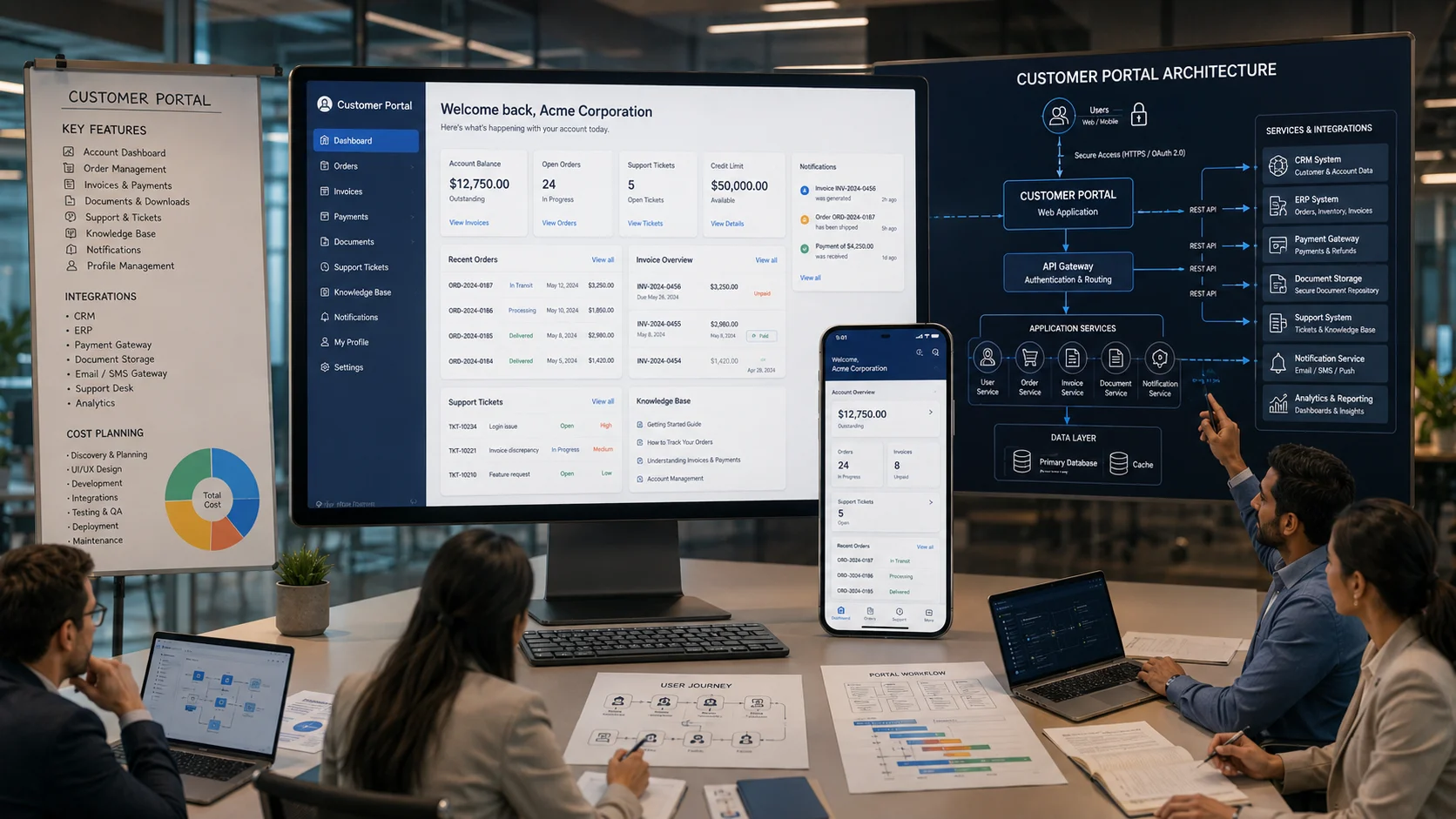
Customer portal development gives businesses a secure digital environment where customers can access information, manage accounts, track requests, view documents, communicate with the business, make payments, and complete routine tasks without depending on email or telephone support for every interaction.
For a small business, a customer portal may begin as a simple authenticated area for viewing orders, invoices, documents, and support requests. For an enterprise organization, it may become a complex digital platform connected with CRM, ERP, payment systems, document management, customer support, analytics, and AI-powered automation.
The technical complexity therefore varies significantly.
A customer portal is not simply a website with a login page. A useful portal must understand who the customer is, which information they are permitted to access, what actions they can perform, which business systems contain the required data, and how every transaction should be validated and recorded.
This guide explains the essential features, business benefits, development costs, architecture, security requirements, integrations, technology considerations, and implementation process involved in custom customer portal development.
What Is Customer Portal Development?
Customer portal development is the process of designing and building a secure web-based application through which customers can access personalized information and interact with a business.
Unlike a public website, which generally presents the same information to every visitor, a customer portal provides authenticated and role-specific experiences.
After signing in, a customer might be able to:
- view account information,
- track orders or service requests,
- download invoices and documents,
- make payments,
- submit support requests,
- communicate with account managers,
- manage subscriptions,
- update approved profile information,
- access a knowledge base,
- view project progress, or
- complete industry-specific workflows.
The exact functionality depends on the business model.
A logistics company, healthcare organization, financial services provider, manufacturer, software company, real estate business, and eCommerce platform all have different customer relationships. Their portals should therefore support different processes.
This is the central purpose of custom customer portal development: designing the application around actual customer and operational workflows rather than forcing every business into the same generic portal structure.
Customer Portal vs Website: What Is the Difference?
A business website and a customer portal serve different purposes.
| Area | Business Website | Customer Portal |
|---|---|---|
| Primary Audience | Public visitors and prospects | Authenticated customers or clients |
| Content | Mostly public information | Personalized and account-specific information |
| Authentication | Usually not required | Usually required |
| Transactions | Limited or public workflows | Customer-specific actions and workflows |
| Data Sources | CMS and public APIs | CRM, ERP, databases, payment systems and APIs |
| Permissions | Limited access control | Role-based and record-level access |
| Primary Objective | Marketing and information | Service delivery and customer operations |
In many organizations, the website attracts and informs customers while the portal supports the relationship after login.
Customer Portal vs Customer Self-Service Portal
The terms customer portal and customer self-service portal are often used interchangeably, but there can be a difference in emphasis.
A customer portal may support a broad range of interactions, including:
- account management,
- documents,
- orders,
- projects,
- payments,
- communication, and
- support.
A self-service portal focuses specifically on enabling customers to find information and complete routine service tasks independently.
For example, self-service functionality may allow customers to:
- search a knowledge base,
- check order status,
- download invoices,
- submit and track support cases,
- update account information, and
- access product documentation.
In practice, modern customer portals often combine both models.
Why Are Businesses Investing in Customer Portals?
Many businesses still manage customer interactions through a combination of email, telephone calls, spreadsheets, messaging applications, and manually prepared documents.
This approach may work at a small scale.
As customer volume increases, problems appear:
- customers repeatedly request information already stored in business systems,
- employees manually prepare status updates,
- documents are distributed through email attachments,
- support teams answer the same questions repeatedly,
- customers cannot see the status of requests,
- information becomes fragmented across communication channels, and
- employees spend time coordinating information instead of solving complex problems.
A portal provides a structured digital channel between the customer and the business.
For businesses considering this approach, our web portal development services support custom customer portals, vendor portals, member platforms, dashboards, workflow applications, and integrated business systems.
Essential Features of a Customer Portal
Not every portal needs every possible feature. The correct feature set should follow the customer journey and business process.
However, several capabilities appear frequently in successful portal projects.
1. Secure User Registration and Login
Authentication is the foundation of a customer portal.
Depending on the application, the portal may support:
- email and password authentication,
- single sign-on,
- social authentication where appropriate,
- multi-factor authentication,
- invitation-based registration,
- administrator-created accounts, or
- identity-provider integration.
The registration model should reflect the business.
A public SaaS product may allow open registration. A B2B industrial portal may require customers to be invited and connected to an approved company account.
2. Customer Dashboard
The dashboard should show the most useful information immediately after login.
Depending on the business, this may include:
- open orders,
- service requests,
- pending payments,
- recent documents,
- active subscriptions,
- project milestones,
- support tickets,
- notifications, and
- recommended actions.
A dashboard should help customers understand their current position and next actions without searching through multiple sections.
3. Account and Profile Management
Customers may need to manage:
- contact information,
- billing details,
- shipping addresses,
- authorized users,
- communication preferences, and
- notification settings.
Not every field should necessarily be editable.
Some information may require verification or administrative approval before changes are applied to the underlying CRM or ERP system.
4. Order and Service Tracking
Customers frequently contact businesses to ask:
- Has my order been confirmed?
- When will it be dispatched?
- What is the current project status?
- Has my service request been assigned?
- When will the work be completed?
A portal can provide transparent status information directly from the relevant operational systems.
The workflow should use clearly defined statuses that customers can understand.
5. Document Management
Customer relationships often involve documents such as:
- quotations,
- invoices,
- contracts,
- statements,
- certificates,
- reports,
- project documents, and
- technical files.
A secure document area can reduce dependence on email attachments and provide a consistent location for current and historical files.
Document permissions are critical. Customers must only be able to access files associated with their authorized account, organization, project, or transaction.
6. Online Payments and Billing
Depending on the business model, a customer portal can support:
- invoice payment,
- subscription management,
- payment history,
- receipt downloads,
- outstanding balance visibility, and
- payment method management.
Payment integrations should use established payment providers and appropriate security practices rather than unnecessarily storing sensitive payment information within the portal application.
7. Support Ticket Management
A customer support module can allow customers to:
- create support requests,
- select a category,
- attach files,
- view status,
- communicate with support staff,
- review previous requests, and
- confirm resolution.
This creates a structured history compared with support conversations distributed across multiple email threads and messaging channels.
8. Knowledge Base and Self-Service Support
A customer self-service portal can provide access to:
- frequently asked questions,
- product documentation,
- setup instructions,
- troubleshooting guides,
- video tutorials, and
- policy information.
The content can be organized according to customer type, product, service, subscription plan, or other relevant context.
Self-service guidance from major CRM platforms emphasizes that portals can give customers continuous access to information and routine actions while allowing service teams to focus on cases requiring greater assistance.
9. Notifications and Alerts
Customers should not need to repeatedly check the portal for important changes.
Notifications can be triggered for events such as:
- order status changes,
- new invoices,
- payment confirmation,
- ticket updates,
- document availability,
- subscription renewal,
- project milestone completion, and
- required customer actions.
Notification channels may include portal notifications, email, SMS, or mobile push notifications depending on the system.
10. Role-Based Access Control
B2B customer portals often need more complex permissions than consumer applications.
For example, one customer organization may have:
- an account administrator,
- finance users,
- purchasing users,
- operations users, and
- read-only users.
Each role may need access to different modules and actions.
A finance user may access invoices and statements while an operations user accesses service requests and project status.
11. Search and Filtering
As portal data grows, customers need efficient ways to locate information.
Useful search and filtering may cover:
- orders,
- invoices,
- documents,
- support requests,
- projects, and
- knowledge articles.
Search design should consider actual customer terminology rather than only internal database labels.
12. Mobile-Responsive Experience
Customers may access the portal from desktop computers, tablets, and smartphones.
The portal should support responsive layouts and efficient mobile workflows.
If customers regularly use the system in the field or require device capabilities, a dedicated mobile application may also be appropriate. Businesses evaluating this requirement can review our mobile application development services.
Benefits of Customer Portal Development
24/7 Access to Information
Customers can access available account information and complete supported tasks without waiting for business hours.
This does not eliminate the need for human service. It gives customers an additional channel for routine interactions.
Reduced Repetitive Support Work
If customers can independently retrieve invoices, check status, update permitted information, access documentation, and track tickets, employees can spend less time responding to repetitive information requests.
Improved Customer Transparency
A portal can make process status visible.
Customers can see whether a request is:
- received,
- under review,
- awaiting customer information,
- in progress,
- completed, or
- closed.
Clear status information can reduce uncertainty and unnecessary follow-up communication.
Centralized Customer Experience
Instead of distributing information across email, spreadsheets, cloud folders, support applications, and messaging tools, the portal can provide a single customer-facing access point.
The underlying information may still come from several systems, but the customer experience is unified.
Better Data Collection
Structured forms and workflows can improve data quality.
Instead of receiving incomplete requests through free-form email, the portal can request the specific information required for a process.
Scalable Customer Operations
As a company grows, the number of customer interactions can increase faster than the service team.
A well-designed portal can handle many routine interactions digitally while preserving human support for situations that require expertise or judgment.
Improved Integration Between Customers and Operations
A portal can connect customer actions directly with internal workflows.
For example:
- a customer submits a service request,
- the request is validated,
- the CRM or service system is updated,
- the appropriate team is notified,
- status changes are synchronized, and
- the customer sees progress in the portal.
This reduces manual coordination between customer communication and operational systems.
Customer Portal Architecture
The architecture of a secure customer portal software platform depends on scale, integration requirements, transaction volume, security, and business complexity.
A typical architecture can include the following layers.
1. Frontend Application Layer
The frontend is the customer-facing interface.
It handles:
- navigation,
- dashboards,
- forms,
- data visualization,
- responsive behavior, and
- user interactions.
Depending on project requirements, frontend technologies may include React.js, Vue.js, or server-rendered application interfaces.
2. Application and Business Logic Layer
The backend handles the rules that determine how the portal behaves.
This may include:
- account permissions,
- workflow rules,
- validation,
- notifications,
- transaction processing,
- document access, and
- integration orchestration.
Technologies such as PHP and Laravel or Node.js may be appropriate depending on the application architecture and development requirements.
3. Authentication and Authorization Layer
This layer verifies user identity and determines what each authenticated user is permitted to access.
Authorization should be enforced on the server side.
Hiding a button in the user interface is not an access-control mechanism.
4. API and Integration Layer
The portal may need to communicate with:
- CRM platforms,
- ERP systems,
- payment gateways,
- accounting applications,
- document systems,
- support platforms,
- shipping providers,
- identity providers, and
- custom business applications.
The integration layer controls how information is exchanged between these systems.
5. Data Layer
The portal may have its own database for portal-specific information while retrieving other information from authoritative business systems.
Architecture planning should clearly define which system owns each type of data.
For example:
- CRM may own customer relationship data,
- ERP may own invoice and order records,
- the portal may own notification preferences, and
- a document service may own file storage.
6. File and Document Storage Layer
Documents may require:
- secure object storage,
- access-controlled downloads,
- temporary signed links,
- version management,
- retention policies, and
- malware scanning.
7. Notification Layer
A dedicated notification service can manage email, SMS, push, and in-application notifications.
Asynchronous processing is useful for notification workflows so that the customer does not need to wait for every external communication service before a portal request completes.
8. Monitoring and Audit Layer
A production portal should support appropriate monitoring and audit capabilities.
Depending on requirements, this may include:
- authentication events,
- administrative actions,
- important customer transactions,
- integration failures,
- application errors,
- performance monitoring, and
- security events.
Example Customer Portal Architecture Flow
Consider a customer checking an invoice and making a payment.
A simplified workflow may be:
- The customer signs in through the authentication system.
- The portal verifies identity and permissions.
- The frontend requests invoice information from the backend API.
- The backend retrieves authorized invoice data from the ERP integration.
- The portal displays the invoice.
- The customer chooses to pay.
- The backend creates a payment transaction through the payment provider.
- The customer completes the payment through the approved payment flow.
- A verified payment event updates the relevant business workflow.
- The portal displays the updated payment status.
- A receipt or confirmation notification is generated.
Each step involves specific security, error handling, synchronization, and audit requirements.
Customer Portal Security Requirements
Security should be part of the architecture from the beginning of customer portal development.
Strong Authentication
Use appropriate password policies, secure password storage, rate limiting, session controls, and multi-factor authentication where the risk level requires it.
Server-Side Authorization
Every request for protected information should verify that the authenticated user is permitted to access the requested record or action.
This is particularly important in multi-tenant systems where many customer organizations use the same application.
Least-Privilege Permissions
Users and integrations should receive only the permissions required for their tasks.
Secure API Design
APIs should implement:
- authentication,
- authorization,
- input validation,
- rate limiting where appropriate,
- secure error handling,
- logging, and
- protection against common API vulnerabilities.
Encryption
Sensitive information should be protected in transit and, where appropriate, at rest.
Secure File Handling
Uploaded files should be validated and handled according to their risk.
Publicly predictable file paths should not expose private customer documents.
Session Management
Portal architecture should consider:
- session expiration,
- secure cookies,
- logout behavior,
- device and token management, and
- re-authentication for sensitive actions.
Audit Logging
Important business and security events should be logged according to the requirements of the application.
Audit records are particularly important for finance, healthcare, enterprise, and other regulated or high-accountability workflows.
Backup and Disaster Recovery
A customer portal needs an appropriate backup strategy covering application data, configuration, and other critical components.
Recovery procedures should be tested rather than assumed.
Customer Portal Integrations
The value of a portal often depends on its integrations.
CRM Integration
CRM integration can provide:
- customer profile information,
- account relationships,
- sales opportunities,
- service history, and
- communication context.
ERP Integration
ERP integration may provide:
- orders,
- invoices,
- statements,
- inventory availability,
- delivery status, and
- transaction information.
Payment Gateway Integration
This allows customers to complete approved payment workflows through the portal.
Support System Integration
The portal can create, display, and update support requests while the internal service team continues using its support management system.
Document Management Integration
Documents can be made available according to customer, account, project, or transaction permissions.
Email and Notification Integration
Communication services can notify customers about important events and required actions.
AI Integration
AI can support appropriate portal workflows such as:
- knowledge retrieval,
- support request classification,
- document extraction,
- customer history summarization,
- contextual assistance, and
- workflow recommendations.
Businesses exploring these capabilities can review our AI development services for custom AI integration and business automation requirements.
How Much Does Customer Portal Development Cost?
There is no reliable universal price for customer portal development because the term can describe applications with very different scope.
A simple portal may provide authentication, a dashboard, document access, and basic support requests.
A complex enterprise portal may include:
- multiple customer organizations,
- advanced role permissions,
- CRM integration,
- ERP integration,
- payment workflows,
- complex documents,
- mobile applications,
- AI capabilities,
- multilingual interfaces,
- advanced reporting, and
- high availability infrastructure.
The development cost should therefore be estimated after requirements analysis.
Primary Factors Affecting Customer Portal Cost
Number of User Roles
A portal with one customer role is simpler than a B2B platform with organization administrators, finance users, purchasing users, operators, internal account managers, and system administrators.
Number of Modules
Every major functional area adds design, development, testing, and maintenance requirements.
Integration Complexity
Connecting a modern documented API is different from integrating with a legacy system that has limited connectivity.
Data Migration
Historical customer accounts, documents, transactions, and other information may need cleaning, transformation, and migration.
Security Requirements
Financial, healthcare, enterprise, and other sensitive applications may require additional security controls, auditability, testing, and infrastructure.
UI/UX Complexity
Complex workflows require careful interface design.
Our UX and UI designing services support user journeys, dashboards, responsive interfaces, workflow design, and digital product usability.
Infrastructure Requirements
Hosting costs depend on:
- traffic,
- data volume,
- file storage,
- availability requirements,
- geographic requirements, and
- backup and recovery strategy.
Ongoing Maintenance
A portal requires ongoing:
- security updates,
- framework maintenance,
- integration monitoring,
- performance optimization,
- bug fixing, and
- feature improvements.
Custom Customer Portal vs Ready-Made Portal Software
Businesses can choose between custom development and configurable portal products.
| Factor | Custom Customer Portal | Ready-Made Portal |
|---|---|---|
| Initial Implementation | Usually longer | Usually faster |
| Workflow Flexibility | High | Depends on product limits |
| Custom Integrations | Can be designed as required | Depends on APIs and extensions |
| Product Roadmap | Business-controlled | Vendor-controlled |
| Maintenance | Business or development partner | Core platform managed by vendor |
| Unique Business Processes | Strong fit | May require compromises |
A ready-made portal can be appropriate when requirements closely match available product capabilities.
Custom development becomes more relevant when the portal is closely connected to unique operations, customer workflows, specialized permissions, or multiple existing systems.
Customer Portal Development Process
Step 1: Business and Customer Journey Analysis
Identify:
- who will use the portal,
- what customers currently request from employees,
- which tasks customers should complete independently,
- which information should be visible, and
- which processes require approval.
Step 2: Requirements and Scope Definition
Define the initial modules and separate essential requirements from future improvements.
This helps prevent an uncontrolled first release.
Step 3: Integration Assessment
Review the existing CRM, ERP, accounting, payment, document, and support systems.
Verify actual API capabilities before finalizing architecture.
Step 4: UX and UI Design
Create:
- user journeys,
- information architecture,
- wireframes,
- dashboard concepts,
- responsive layouts, and
- interactive prototypes where appropriate.
Step 5: Architecture and Security Design
Define:
- application architecture,
- authentication,
- permissions,
- data ownership,
- API design,
- file storage,
- logging, and
- deployment architecture.
Step 6: Phased Development
Develop the system in manageable modules.
For example:
- authentication and account management,
- dashboard and core data access,
- orders and documents,
- support workflows,
- payments, and
- advanced automation.
Step 7: Integration Testing
Test successful and failed scenarios.
This includes:
- API failures,
- invalid permissions,
- duplicate requests,
- payment interruptions,
- missing data,
- expired sessions, and
- notification failures.
Step 8: Security Testing
Review authentication, authorization, input handling, file access, APIs, session behavior, and other relevant attack surfaces.
Step 9: User Acceptance Testing
Real users should test whether the portal supports actual tasks efficiently.
A technically correct application can still fail if customers cannot understand the workflow.
Step 10: Deployment and Continuous Improvement
After launch, monitor:
- portal adoption,
- most-used features,
- failed workflows,
- support requests,
- performance, and
- customer feedback.
Use this information to guide future improvements.
Customer Portal Use Cases by Industry
Manufacturing Customer Portal
A manufacturing portal can provide:
- quotation requests,
- order status,
- technical documents,
- certificates,
- dispatch information, and
- service requests.
Healthcare Portal
Depending on the healthcare service and applicable requirements, portal functionality may include:
- appointment management,
- document access,
- service communication,
- billing information, and
- administrative workflows.
Healthcare portals require careful privacy, security, authorization, and regulatory consideration.
Financial Services Portal
Potential features include:
- application status,
- document submission,
- transaction information,
- statements,
- payment schedules, and
- service requests.
Real Estate Customer Portal
A portal can provide:
- property information,
- booking or enquiry status,
- documents,
- payment schedules,
- construction updates, and
- service communication.
Logistics Customer Portal
Potential functionality includes:
- shipment booking,
- tracking,
- delivery documents,
- invoice access,
- exception visibility, and
- support requests.
SaaS Customer Portal
A SaaS portal may include:
- subscription management,
- billing,
- usage information,
- support,
- documentation,
- team management, and
- API credentials.
How AI Can Improve Customer Portals
AI can add useful capabilities to customer portals when applied to specific workflows.
AI Knowledge Assistant
Customers can ask questions and receive answers grounded in approved documentation and account context.
Support Request Classification
AI can interpret a customer request, suggest a category, retrieve relevant context, and route the case appropriately.
Document Processing
AI can help extract information from customer-submitted documents and identify missing information before the workflow proceeds.
Account Summaries
For complex B2B relationships, AI can summarize approved information from multiple systems for customers or internal account managers.
Personalized Guidance
The portal can recommend appropriate next steps based on account status and defined business logic.
AI should complement the portal architecture rather than replace reliable business rules, permissions, and deterministic transaction processing.
How to Measure Customer Portal ROI
Portal success should be measured using business outcomes rather than login counts alone.
Useful metrics can include:
- portal adoption rate,
- monthly active customers,
- percentage of invoices downloaded through the portal,
- percentage of support requests created digitally,
- reduction in repetitive status enquiries,
- self-service completion rate,
- payment completion rate,
- average support response time,
- customer satisfaction, and
- employee time saved.
The relevant metrics depend on the original business problem.
If the portal was developed to reduce repetitive order-status enquiries, measure that outcome directly.
Common Customer Portal Development Mistakes
Building Features Without Understanding the Customer Journey
A feature list is not a portal strategy.
Start with the tasks customers need to complete.
Showing Internal System Complexity to Customers
Customers should not need to understand the company’s internal ERP structure or department terminology.
The portal should translate internal complexity into clear customer workflows.
Weak Permission Design
Access control must be designed at the data and action level, particularly for B2B and multi-tenant portals.
Ignoring Integration Failure Scenarios
External systems can become unavailable.
The portal needs appropriate error handling, retries, status communication, and monitoring.
Trying to Build Everything in the First Release
A phased approach is usually more manageable.
Start with the highest-value customer workflows and expand based on usage.
Ignoring Mobile Usability
Responsive behavior should be tested using real workflows, not only by shrinking desktop layouts.
Launching Without an Adoption Plan
Customers need a clear reason to use the portal.
Onboarding communication, simple navigation, useful features, and employee support for adoption are important.
Conclusion
Customer portal development can transform how customers interact with a business, but a successful portal requires more than adding a login area to an existing website.
The portal must connect customer needs with business operations.
That requires clear user journeys, appropriate features, secure authentication, strong authorization, reliable integrations, understandable status information, responsive design, monitoring, and a realistic maintenance plan.
The most valuable portals solve specific problems.
They reduce repetitive information requests, give customers better visibility, simplify document access, structure support workflows, connect customer actions with internal systems, and provide a scalable digital channel for ongoing service delivery.
The right implementation approach depends on the organization.
Some businesses need a focused self-service portal. Others require an enterprise platform connected with CRM, ERP, payment systems, documents, support workflows, mobile applications, and AI automation.
The development process should begin by understanding customers, processes, data, and integrations before selecting technologies or building features.
Planning a Custom Customer Portal?
If your customers depend heavily on email, telephone calls, spreadsheets, or manual requests to access information and complete routine tasks, a customer portal may provide a more structured and scalable digital experience.
Digitize Info System develops customer portals, client portals, vendor portals, business dashboards, workflow systems, SaaS applications, API integrations, and connected enterprise software.
Explore our web portal development services and portfolio, or contact Digitize Info System to discuss your customer journey, current software systems, required integrations, security requirements, and portal objectives.
Frequently Asked Questions
A customer portal should include secure login, account management, document access, support ticket tracking, and payment capabilities. These features empower customers to complete routine tasks without relying on email or phone support.
Providing these self-service options improves customer satisfaction and reduces the workload on support teams.
Customer portals improve client relationships by offering a convenient hub for communication, issue resolution, and transaction history. They make interactions more transparent and keep customers informed about the status of their requests.
This reliable experience builds trust and encourages customers to remain engaged with the business.
Secure customer portal architecture includes strong authentication, encrypted storage, role-based access control, and secure API connections. These elements help protect customer data and ensure only authorised users can access sensitive information.
Building security into the portal from the ground up reduces risk and supports compliance with data privacy requirements.
Customer portal cost planning is important because it helps small businesses balance investment with expected value. Understanding design, development, hosting, and maintenance costs ensures the portal delivers a strong return without straining the budget.
Careful planning also helps avoid scope creep and makes it easier to build a portal that meets customer needs within a realistic timeframe.
